The fastest way to log a meal in BeforeIBite is to snap a photo. The AI identifies what's on the plate, estimates portions, and produces an editable nutrition breakdown — usually in under five seconds.
The flow
- From the Today tab, tap the + button in the top right. This opens the capture sheet.
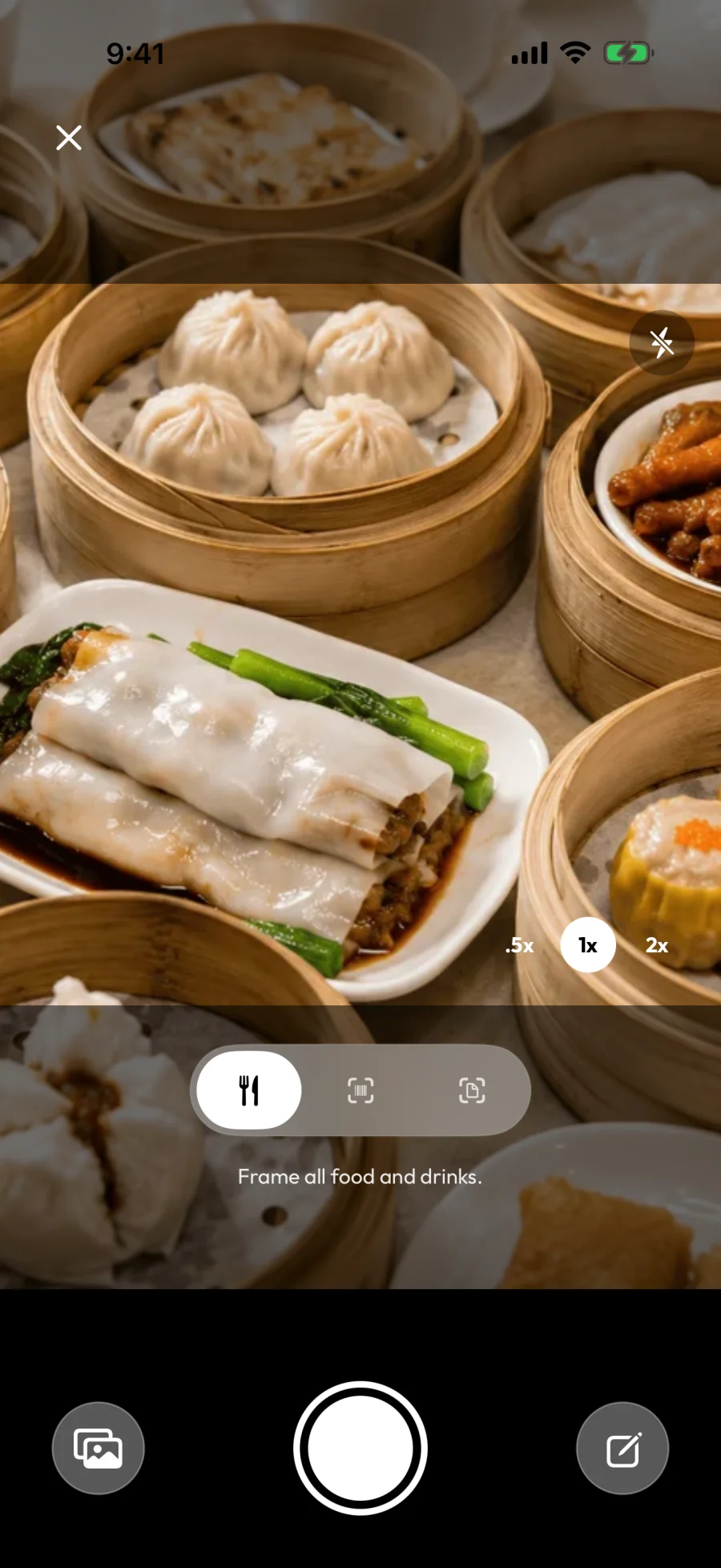
- Make sure the scanner mode at the bottom is set to Food scanner. You'll see the prompt "Frame all food and drinks."
- Either Take Photo with the in-app camera, or Choose from Library to pick an existing photo.
- The first time you use this feature, you'll see a short disclosure ("Before you scan") about how the AI works — tap I understand to continue.
- The Analyzing your meal screen runs for a few seconds while the photo is sent to the AI.
- You land in the meal editor with each food item the AI detected, its portion, and the calorie + macro breakdown.
- Adjust anything that's off (portion, item name, removing items the AI invented), then tap the ✓ to save.
Tips for accurate results
The AI gets noticeably better with a few small habits at capture time:
- Top-down angle. A bird's-eye shot makes it much easier for the AI to identify everything on the plate and estimate portion sizes.
- Include a reference object. A standard fork, a phone, or a hand near the dish helps the AI calibrate scale, especially for shared platters and bowls.
- Good light. Avoid heavy yellow indoor lighting if you can — natural light or a brighter overhead lamp produces a more readable photo.
- Whole meal in one shot. If a dish has multiple components (rice, curry, vegetable side), keep them in the same frame instead of scanning each separately.
When the result needs fixing
The AI is wrong sometimes — especially on mixed dishes, unusual cuisines, or anything photographed at a steep angle. You have four options:
- Edit it. Tap the item to adjust the portion, swap the unit, or rename it. See Edit or correct a logged meal for the full editor.
- Re-shoot. Cancel and try again with better lighting or a top-down angle.
- Type it instead. Drop into manual entry — see Log a meal by typing the name.
- Send feedback. Shake your phone to open the feedback form. We use feedback to improve the model over time.
For the deeper picture on how accurate to expect the AI to be — and when to verify rather than trust it — see How accurate is BeforeIBite's AI?.
Shared meals
If you're logging a dish that several people ate from — a hot pot, a thali, a pizza, a family-style stir-fry — log the whole dish here, then split it in the next step. That's the BeforeIBite workflow that most other trackers don't have. See How to log shared meals.