Most calorie trackers assume a single plate in front of one person. BeforeIBite was built around the way most of the world actually eats — from the middle of the table. This article walks through the split-dish workflow.
The basic pattern
You always do the same two things, in this order:
- Log the whole dish first — using any capture method (photo, barcode, label, or text).
- Split it — set how many people shared it and how big your share was. Your daily totals only count your portion.
Log the dish as it actually arrived at the table, not as your portion. That makes the AI's job easier and gives you a cleaner record of what was eaten.
The flow
- Log the meal using your preferred method — see Log a meal from a photo, Scan a barcode, Scan a nutrition label, or Log a meal by typing the name.
- Open the meal and tap the Split dish card near the bottom of the meal detail — it's labelled "Adjust portions for shared meals".
- Set how many people shared the dish (including yourself) with the − and + controls.
- Set Your share. It defaults to an even split — 50% for two people, 25% for four, and so on. If you ate more or less than an even share, drag the slider.
- Tap Split Dish to confirm. Your daily totals now reflect only your share.
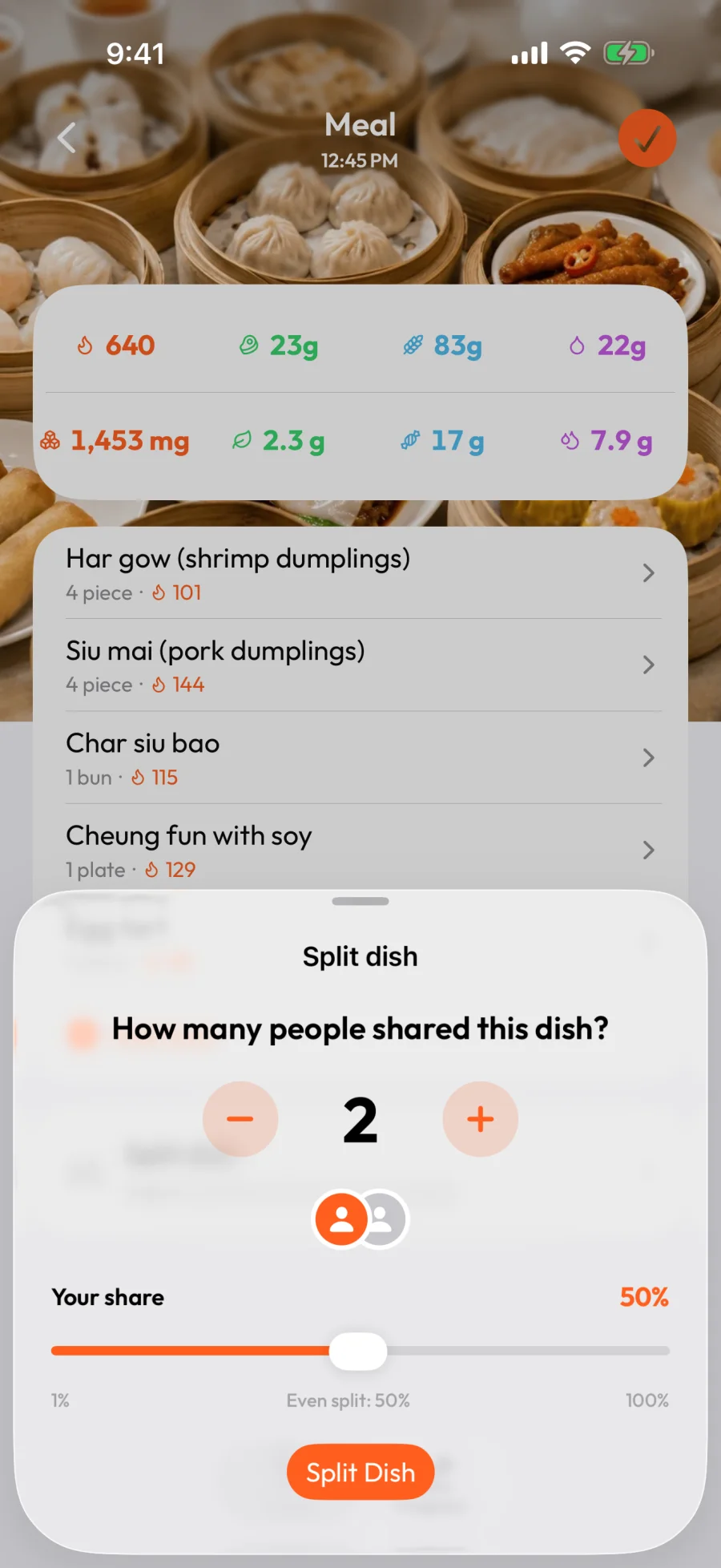
Worked example
The screenshot above shows a 640-calorie dim sum spread shared by 2 people, at an even 50% split:
- Your daily totals get 640 × 50% = 320 calories.
- Macros split the same way — protein 23g → 11.5g, carbs 83g → 41.5g, fat 22g → 11g.
- If you actually ate more than half, drag Your share up. At 65% you'd log 416 calories instead.
When an even split isn't right
People rarely eat exactly equal shares. The Your share slider is the first tool for this — drag it to the percentage you actually ate instead of leaving it at the even-split default.
If your share varied item by item — you ate most of the dumplings but skipped the buns — you have two more options:
- Split the dish, then fine-tune individual items. After splitting, open any item and adjust its portion. See Edit or correct a logged meal.
- Skip the split and log only what you ate. If you only had one or two things from a big spread, it's often faster to log each one as its own entry at its true portion size.
Cuisines this is designed for
The split-dish flow is built around the way these meals work in real life:
- East and Southeast Asian — hot pot, Chinese banquet platters, dim sum, Korean BBQ and banchan, Vietnamese family rice dishes.
- South Asian — thali platters, family-style curries with shared roti and rice.
- Middle Eastern and Mediterranean — mezze platters, tapas, Greek meze, Lebanese spreads.
- Latin American — paella pans, family-style asados and parrillas.
- Western — pizza, sharing-plate restaurants, charcuterie boards, family stir-fries at home.
You don't have to use it on every meal. But on the meals where most trackers force you to guess, it's the difference between a usable log and giving up halfway through dinner.