Calorie tracker comparison
Cronometer vs Before I Bite
Cronometer is a strong option when detailed nutrient tracking and nutrition analysis drive your choice. Before I Bite is worth trying when the hard part is logging your share of a mixed or family-style meal.
By the Before I Bite team · Sources checked . We make Before I Bite. This comparison is based on published documentation, not a controlled accuracy or speed test.
Which app fits your needs?
Choose Cronometer for
Detailed nutrient targets, food-data transparency, and deeper charts and analysis with Gold.
Consider Before I Bite for
Scanning a shared dish, adjusting what you ate, and trying core photo and label tools free with ads.
Try a shared mealFeatures at a glance
Compare the plan and workflow you would actually use.
| What matters | Cronometer | Before I Bite |
|---|---|---|
| Free barcode scanning[1][5] | Included in Basic | Included free |
| AI photo and voice[1][5] | Gold | Photo and quick add included free with ads |
| Nutrient tracking[1][5] | Up to 95 nutrients and compounds | Calories, macros, and supported micronutrient targets |
| Sharing food with friends[4][6] | Gold custom-food and recipe exchange | iPhone meal links and adjustable personal shares |
| Ad-free experience[1][5] | Gold | Pro; price shown in local store |
Pros and cons of each app
Cronometer: pros
Detailed tracking in the free plan
Basic includes barcode scanning, macro and micronutrient targets, and tracking up to 95 nutrients and other compounds. It is a substantial free option if the nutritional detail matters to you.[1]
AI convenience is available
Gold includes photo and voice logging. Cronometer says its AI tools help match foods while nutrition values come from established food databases. This is a useful data-provenance distinction, not proof of superior photo accuracy.[3][1]
Tools for deeper analysis
Gold adds custom charts, nutrition scores, repeat items, and recipe importing. If you want to investigate patterns rather than only save meals, those tools may justify the paid plan.[1]
Recipe exchange without diary access
Gold users can add friends to exchange custom foods and recipes. The sharing guide explicitly distinguishes that from exposing a diary or other personal information.[4]
Cronometer: cons and tradeoffs
AI photo and voice entry require Gold
Free barcode access does not mean every convenient logging method is free. If photo logging without subscribing is important, compare Gold with Before I Bite's ad-supported capture tools.[1][5]
Friend recipe sharing is a paid feature
The documented friend-sharing flow is for Gold users. Its value is exchanging custom foods and recipes; assess whether that matches your needs at an occasional shared dinner.[4]
More nutrient fields do not remove portion uncertainty
A detailed nutrient report is only as useful as the food and portion you log. For mixed dishes, check the underlying match and amount. This is a general tracking limitation, not evidence that Cronometer's estimates are worse.[3][8]
Before I Bite: pros
Start with the shared dish
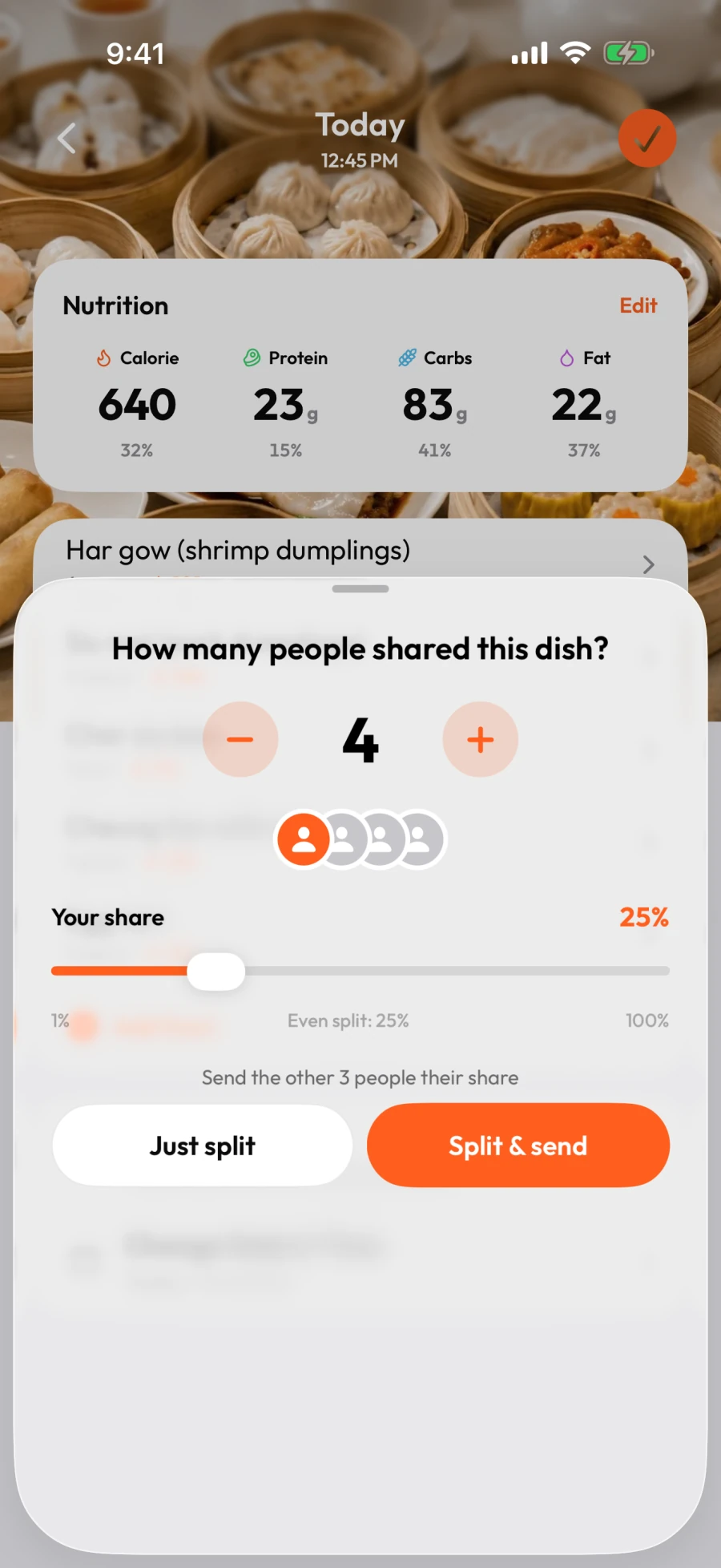
Set the number of diners, then adjust your share above or below an equal split. After splitting, you can change individual food portions rather than assume you ate the same fraction of every item.[6][7]
Core logging tools are available free
Photo analysis, barcode scanning, nutrition-label OCR, and quick add are included in the free plan. Pro removes ads rather than unlocking a different set of logging tools.[5]
Send another diner a starting portion
The documented iPhone flow sends a meal link that the recipient can review, adjust, and save as their own copy. You do not need to rebuild the same meal in both logs.[6]
Before I Bite: cons and tradeoffs
Free use includes ads
Ads appear during photo analysis on iOS and Android and during label scanning on iOS. If you want an ad-free experience, compare the Pro price shown in your own store before subscribing.[5]
AI still needs your judgment
A photo cannot reliably reveal every ingredient, cooking fat, or amount eaten. Check the food and portion before saving; splitting an inaccurate whole-dish estimate does not make it accurate.[8][7]
Check the sharing flow on your platform
Our sending and receiving guide shows the iPhone app. Android users may encounter an availability message and need to open the link in a browser. Do not assume the two platforms have identical sharing behavior.[6]
Free plans and paid pricing
Cronometer
Gold: US$59.99/year
The publisher also lists US$10.99/month. Local taxes, stores, and promotions may change the offer; check the price before subscribing.
[2]Before I Bite
Free with ads. Optional Pro.
Core logging tools are included in both plans. Pro removes ads; its local price appears before you subscribe. The annual plan offers a 7-day Pro trial for eligible accounts.[5]
Prices checked October 29, 2026. US references are not local checkout quotes. Compare the total charge and renewal price, not only a monthly equivalent or introductory offer.
How the choice works in practice
Start with the nutrition questions you want answered
Cronometer's range of nutrients and targets is a meaningful reason to choose it. If your daily question is about patterns in fiber, minerals, or other nutrient intake, assess that detail directly rather than reduce the choice to a calorie ring. Before I Bite includes nutrient targets too, but this page does not claim it matches every Cronometer field or analysis tool. Choose the product whose available information supports the decisions you actually want to make.[1][5]
Free barcode scanning is a strength on both sides
There is no reason to switch from Cronometer just to obtain a free barcode scanner: Basic already includes one. The more relevant difference is whether you want meal-photo analysis and other capture tools in a free, ad-supported plan or are happy to pay for Gold. Test your real packaged foods and review the portion units. A correct food match with an incorrect serving can still produce a misleading daily total.[1][5][8]
A shared recipe and a shared dinner are different tasks
Cronometer Gold lets friends exchange recipes without sharing their diaries. That can suit people who regularly cook from the same ingredients. Before I Bite's iPhone flow starts with a logged dish, applies a split, and sends another diner a portion they can review and save. Think about whether you are sharing a recipe to cook again or recording food you just ate together. Both approaches can be useful; neither makes a weighed serving unnecessary when precision matters.[4][6][8]
Data provenance is useful; accuracy still needs checking
Cronometer describes its AI logging as combining quick input with nutrition data from established databases. That helps explain where values come from. It does not establish that every photo identifies the correct recipe, cooking method, or amount. Before I Bite's AI estimates also need review. This comparison has no controlled accuracy measurements, so we do not award a winner on recognition, calories, or micronutrients based on marketing statements.[3][8]
Which one should you choose?
Choose Cronometer if nutrient detail, custom targets, and analysis are your main priorities, especially if Basic already meets your needs. Consider Before I Bite if dividing shared dishes and reusing a meal with another diner are the main sources of friction. If you pay for Gold, compare the tools you use throughout a week with the cost of replacing that routine. If you use Basic, try a shared meal before deciding whether another app solves a problem you have.[1][6][5]
Common questions
Does Cronometer offer free barcode scanning?
Yes. Barcode scanning is included in Basic. Before I Bite also includes it free, so free barcode access alone is not a reason to prefer one over the other.[1][5]
Does Cronometer have AI photo logging?
Yes. Cronometer advertises Photo Log and Voice Log as Gold features. It should not be described as a purely manual tracker.[1][3]
Is Before I Bite a replacement for all Cronometer nutrient analysis?
This page does not claim that. Before I Bite supports nutrition targets and meal logging; Cronometer documents up to 95 nutrients and compounds plus Gold analysis tools. Check the particular nutrients and reports you rely on before switching.[1][5]
Sources and how we compared
We reviewed official product pages, support articles, and our own current product documentation. The pros, cons, and recommendations interpret those features for different needs. We did not purchase competitor plans or measure recognition accuracy, speed, weight-loss results, or customer satisfaction. An undocumented feature is not proof of an absent feature. Competitor names belong to their respective owners; this is a comparison by Before I Bite, not an endorsement or partnership.
- Cronometer: Basic and Gold feature comparison
- Cronometer: publisher pricing and business model
- Cronometer: photo and voice logging
- Cronometer: friend and professional sharing
- Before I Bite: free and Pro plans
- Before I Bite: split, send, and save shared meals
- Before I Bite: edit or correct a meal
- Before I Bite: AI accuracy and limitations