Calorie tracker comparison
Lose It! vs Before I Bite
Lose It! centers on a personalized calorie budget and a weight-loss logging habit. Before I Bite centers on capturing meals and adjusting shared portions, with its core tools available free with ads.
By the Before I Bite team · Sources checked . We make Before I Bite. This comparison is based on published documentation, not a controlled accuracy or speed test.
Which app fits your needs?
Choose Lose It! for
A weight-loss calorie budget, routine diary logging, and optional Premium goals and integrations.
Consider Before I Bite for
Family-style meals and flexible portions, especially if you want photo, barcode, and label tools in the free plan.
Try a shared mealFeatures at a glance
Compare the plan and workflow you would actually use.
| What matters | Lose It! | Before I Bite |
|---|---|---|
| Free starting point[1][5] | Calorie budget and food database | Full core logging tools with ads |
| Photo and voice entry[1][5] | Premium | Photo and quick add included free |
| Barcode and label scanning[2][5] | Moving to Premium; some free access remains | Included free |
| Shared portions[4][6] | Recipes and serving counts | Diner count, personal share, and item adjustments |
| Ad-free option[1][5] | Check current Premium offer | Pro removes ads; local store price |
Pros and cons of each app
Lose It!: pros
A clear daily starting point
Basic includes a personalized calorie budget and access to the food database. That gives someone starting a weight-loss diary a specific daily target without first choosing a paid plan.[1]
Several ways to log with Premium
Premium includes photo and voice logging alongside scanning. Snap It accepts a new or existing photo, proposes food matches and serving sizes, and lets you edit the result.[1][3]
More goals and planning controls
Premium adds custom goals, smartwatch and tracker syncing, and future meal logging. These may matter when your tracking routine extends beyond saving what you just ate.[1]
A lifetime purchase option
Lose It! publishes a one-time lifetime route to Premium features. Long-term users can compare that option with recurring subscriptions, accounting for account eligibility and their actual purchase offer.[1]
Lose It!: cons and tradeoffs
Photo and voice logging are paid tools
If your main goal is to try meal-photo analysis without a subscription, Lose It! puts that convenience in Premium. Before I Bite offers photo analysis free with ads.[1][5]
Free scanner access differs by account
Lose It! says barcode and nutrition-label scanning are moving to Premium, with some free members retaining access during the transition. Check your account rather than assume every free user receives the same tools.[2]
Check language support for scanning
The scanner help page currently requires the device language to be English. That is a practical limitation to check if you use your phone in another language.[2]
Lifetime needs a careful renewal check
The company says buying Lifetime does not automatically cancel an existing App Store or Google Play subscription. Existing subscribers need to turn off that renewal separately.[1]
Before I Bite: pros
Start with the shared dish
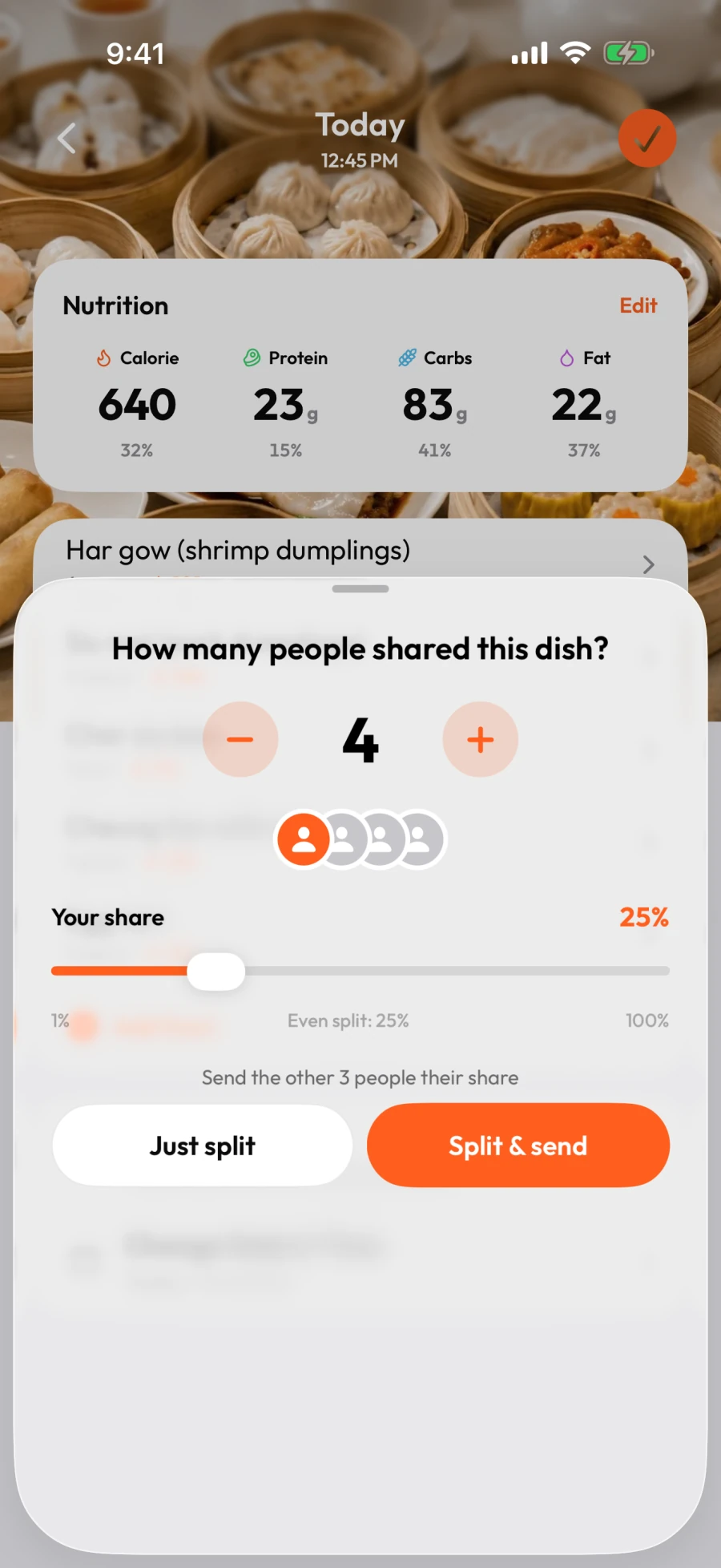
Set the number of diners, then adjust your share above or below an equal split. After splitting, you can change individual food portions rather than assume you ate the same fraction of every item.[6][7]
Core logging tools are available free
Photo analysis, barcode scanning, nutrition-label OCR, and quick add are included in the free plan. Pro removes ads rather than unlocking a different set of logging tools.[5]
Send another diner a starting portion
The documented iPhone flow sends a meal link that the recipient can review, adjust, and save as their own copy. You do not need to rebuild the same meal in both logs.[6]
Before I Bite: cons and tradeoffs
Free use includes ads
Ads appear during photo analysis on iOS and Android and during label scanning on iOS. If you want an ad-free experience, compare the Pro price shown in your own store before subscribing.[5]
AI still needs your judgment
A photo cannot reliably reveal every ingredient, cooking fat, or amount eaten. Check the food and portion before saving; splitting an inaccurate whole-dish estimate does not make it accurate.[8][7]
Check the sharing flow on your platform
Our sending and receiving guide shows the iPhone app. Android users may encounter an availability message and need to open the link in a browser. Do not assume the two platforms have identical sharing behavior.[6]
Free plans and paid pricing
Lose It!
Premium: US$79.99/year
Official standard annual price. Promotions vary. Published lifetime pricing is US$299.99 for Basic accounts or US$229.99 for active paid Premium members; eligibility matters.
[1]Before I Bite
Free with ads. Optional Pro.
Core logging tools are included in both plans. Pro removes ads; its local price appears before you subscribe. The annual plan offers a 7-day Pro trial for eligible accounts.[5]
Prices checked October 29, 2026. US references are not local checkout quotes. Compare the total charge and renewal price, not only a monthly equivalent or introductory offer.
How the choice works in practice
A weight-loss diary or a shared-meal workflow?
These apps overlap in calorie logging but lead with different jobs. Lose It!'s Basic offer starts with a calorie budget; its paid tier expands goals and ways to log. Before I Bite starts with the food you are eating and how much of it belongs in your log. If you usually eat an individual portion and like a daily budget, keep that preference central. If you regularly divide restaurant or home-cooked dishes, examine portion editing as closely as the initial scan.[1][6]
What a photo does and does not solve
Lose It!'s Snap It matches a photo to foods and estimates serving sizes that you can change. Before I Bite also expects you to review the estimate and adjust the meal. A useful photo tool should make corrections manageable when it identifies the wrong dish or assumes too much rice. We have not measured which app is faster or more accurate. The existence of photo logging alone does not answer whether it fits your meals.[3][8][7]
Pay attention to your actual scanner access
The current Lose It! scanner transition makes blanket claims about its free plan unreliable. Your older account may keep access while a new account sees a Premium gate. Before I Bite's documented free plan includes barcode and label scanning, though ads can appear during label scanning on iOS. Try the specific packaged foods and labels you use, and judge the result you can correct and save rather than whether a scanner button is present.[2][5]
Annual subscriptions and lifetime purchases
Lose It!'s official annual reference is US$79.99, but promotions and lifetime eligibility change the decision. A long-term user considering Lifetime should compare the actual checkout amount, understand that it is an additional purchase, and cancel any separate store renewal as instructed. Before I Bite's free plan continues without Pro; Pro's local price is shown before subscribing. Consider the features you expect to use, your tolerance for ads, and whether you want a recurring commitment.[1][5]
Which one should you choose?
Choose Lose It! if its calorie budget and broader Premium goals suit the habit you want to build. Consider Before I Bite if shared portions are the part you find tedious or you want to try capture tools without subscribing. If you already have a working Lose It! routine, test one difficult shared meal before moving your everyday tracking. An alternative should earn its place by improving a real task, not by promising that a new app will automatically improve your results.[1][6][5]
Common questions
Is Lose It! free?
Yes. Basic includes essential calorie tracking and a personalized budget. Premium adds photo and voice logging, custom goals, and other tools. Scanner access is in transition, so free-account availability can differ.[1][2]
How much is Lose It! Premium?
The official standard is US$79.99 per year, checked October 29, 2026. Promotions, store, country, and account history can affect the price shown to you. Verify the renewal amount at checkout.[1]
Can I track shared meals in either app?
Lose It! supports recipes and serving counts. Before I Bite provides a split by diner count, an adjustable personal share, and further item edits. Our documented meal-link sending flow is shown on iPhone; check Android availability separately.[4][6]
Sources and how we compared
We reviewed official product pages, support articles, and our own current product documentation. The pros, cons, and recommendations interpret those features for different needs. We did not purchase competitor plans or measure recognition accuracy, speed, weight-loss results, or customer satisfaction. An undocumented feature is not proof of an absent feature. Competitor names belong to their respective owners; this is a comparison by Before I Bite, not an endorsement or partnership.
- Lose It!: membership tiers and pricing
- Lose It!: barcode and label scanner access
- Lose It!: using Snap It
- Lose It!: official tracking tutorial
- Before I Bite: free and Pro plans
- Before I Bite: split, send, and save shared meals
- Before I Bite: edit or correct a meal
- Before I Bite: AI accuracy and limitations